Coffee Edition: a newspaper my printer prints while I sleep
Every night a Claude routine writes a two-page issue from my notes, GitHub Actions lays it out and checks every page, and a Raspberry Pi Pico 2 W prints it at breakfast. How it works, what broke in the first two weeks, and how to build your own.
Contents
The gist
- Three pieces, joined only by files in a git repository: a Claude routine writes the issue, GitHub Actions turns it into print files, and a Pico 2 W on the home Wi-Fi sends them to the printer.
- The writer can be wrong, so every step after it checks: the layout must fit its columns, the PDF must carry every character, and nothing prints at the wrong hour or twice.
- The Pico only pulls. It asks GitHub for work over ordinary HTTPS, so nothing on the internet can reach into the home network.
- The kit is open source: a template repository, an English setup prompt for Claude Code, and a detailed guide for the Pico.
Kısaca
- Üç parça var ve aralarındaki tek bağ bir git reposundaki dosyalar: Claude routine'i sayıyı yazıyor, GitHub Actions baskı dosyalarına çeviriyor, ev Wi-Fi'ındaki Pico 2 W de yazıcıya gönderiyor.
- Yazar yanılabilir, o yüzden sonraki her adım kontrol ediyor: düzen sütunlara sığmalı, PDF her karakteri taşımalı, hiçbir şey yanlış saatte ya da iki kez basılmamalı.
- Pico yalnızca çekiyor. İşi sıradan HTTPS ile GitHub'dan istiyor; internetten hiçbir şey ev ağına giremiyor.
- Kit açık kaynak: bir template repo, Claude Code için İngilizce bir kurulum prompt'u ve Pico için ayrıntılı bir rehber.
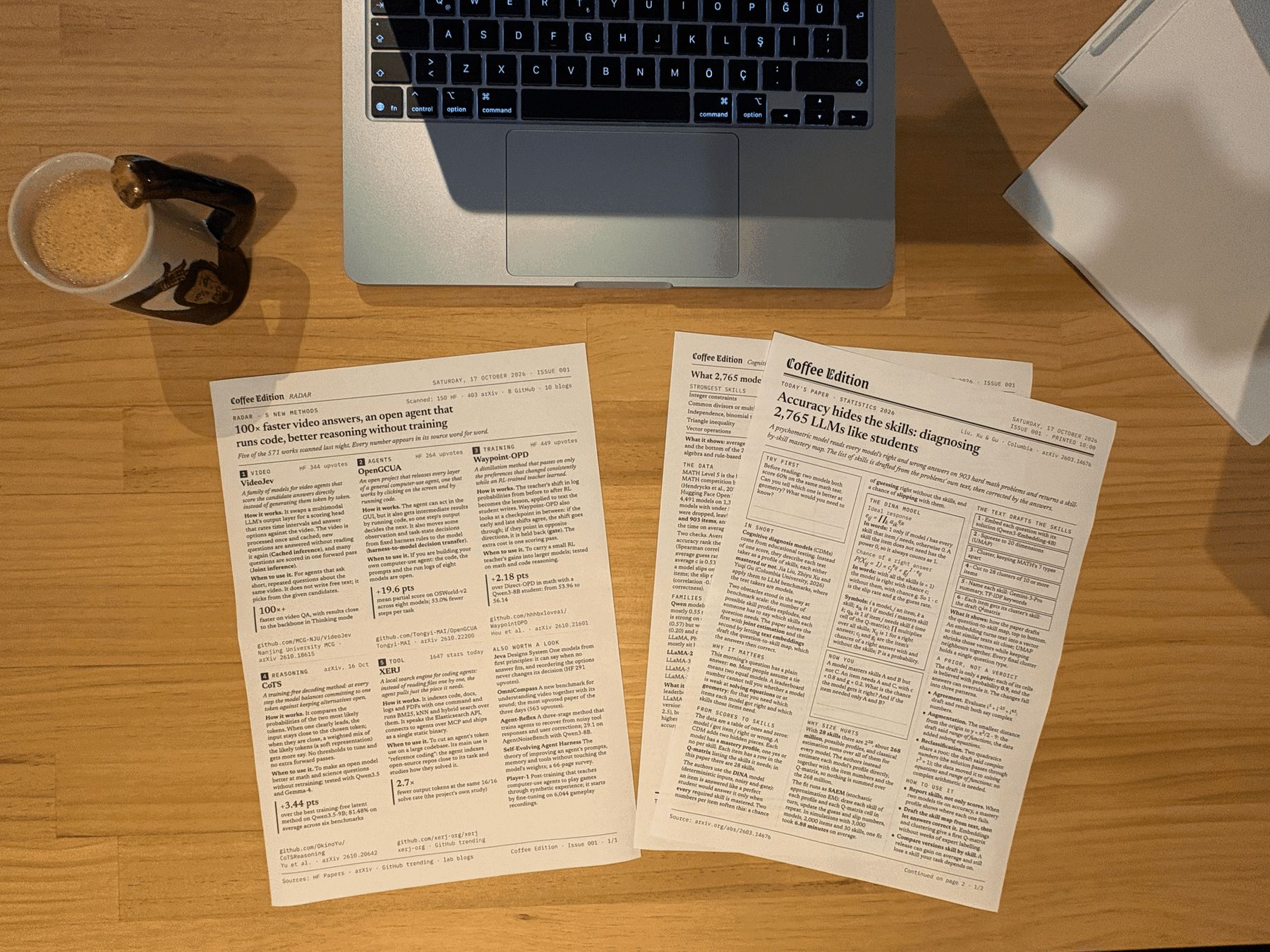
Every morning a two-page newspaper waits on my printer. Nobody at home pressed print: a Claude routine wrote it in the cloud at 05:15, GitHub Actions laid it out and checked every page, and a Raspberry Pi Pico 2 W on the Wi-Fi sent it to the printer at 08:45 (10:00 at weekends). This piece explains the three parts, the guards between them, and what broke in the first two weeks, then shows how to build your own.
Build your own
github.com/ierolsen/
The whole setup is open source as a GitHub template: make a private copy, add your notes, and your printer gets a newspaper every morning.
Why paper
I read a lot on screens and keep little of it. A printed page is finished: it does not refresh, it has no feed under it, and it is still on the table when the coffee is ready. I can write on it. Each issue takes one idea from my notes and explains it the way a good newspaper explains one story: the big picture, how it works, the numbers, the traps, and how to use it.
The constraint that shaped everything else: the paper has to arrive without me. If I have to open a laptop to print it, it stops being a morning ritual and becomes a chore.
How a night works
One night, 14 October, from the logs. The issue started in the cloud, was refused once, was fixed within a minute, and printed on time.
The three parts never talk to each other directly. They share one private git repository: the routine
commits the issue to inbox/ on main, Actions publishes print files to a queue branch and every PDF
to an archive branch, and the Pico reads queue. Every step leaves a file behind, so a bad morning can
always be traced.
Why the Pico pulls
The printer sits behind my home router, and I want it to stay there. Anything that pushes a job to the printer from outside needs a way in: an open port, a tunnel, or a computer at home that stays on. The Pico avoids all of that by asking instead of listening. It makes ordinary outgoing HTTPS requests to GitHub, like a phone does, and talks to the printer on the local network.
Each row of the table is one way to get a job to the printer, with what it needs and why I passed on it. The bold row is the one built here: nothing at home is opened to the internet, no other service sits in the middle, and the only thing left on besides the printer is a tiny board.
| Way to get a job to the printer | What it needs | Why not here |
|---|---|---|
| Push from the cloud | an open port on the router, or a tunnel | something on the internet could then reach a home device |
| A computer at home prints | a computer on all night | the point was nothing left on but the printer and a tiny board |
| A vendor's cloud print service | an account and an app from the printer maker | another service in the middle, with its own rules |
| A board that pulls | outgoing HTTPS and the home Wi-Fi | no port is opened; the token reads one repository only |
The newspaper engine
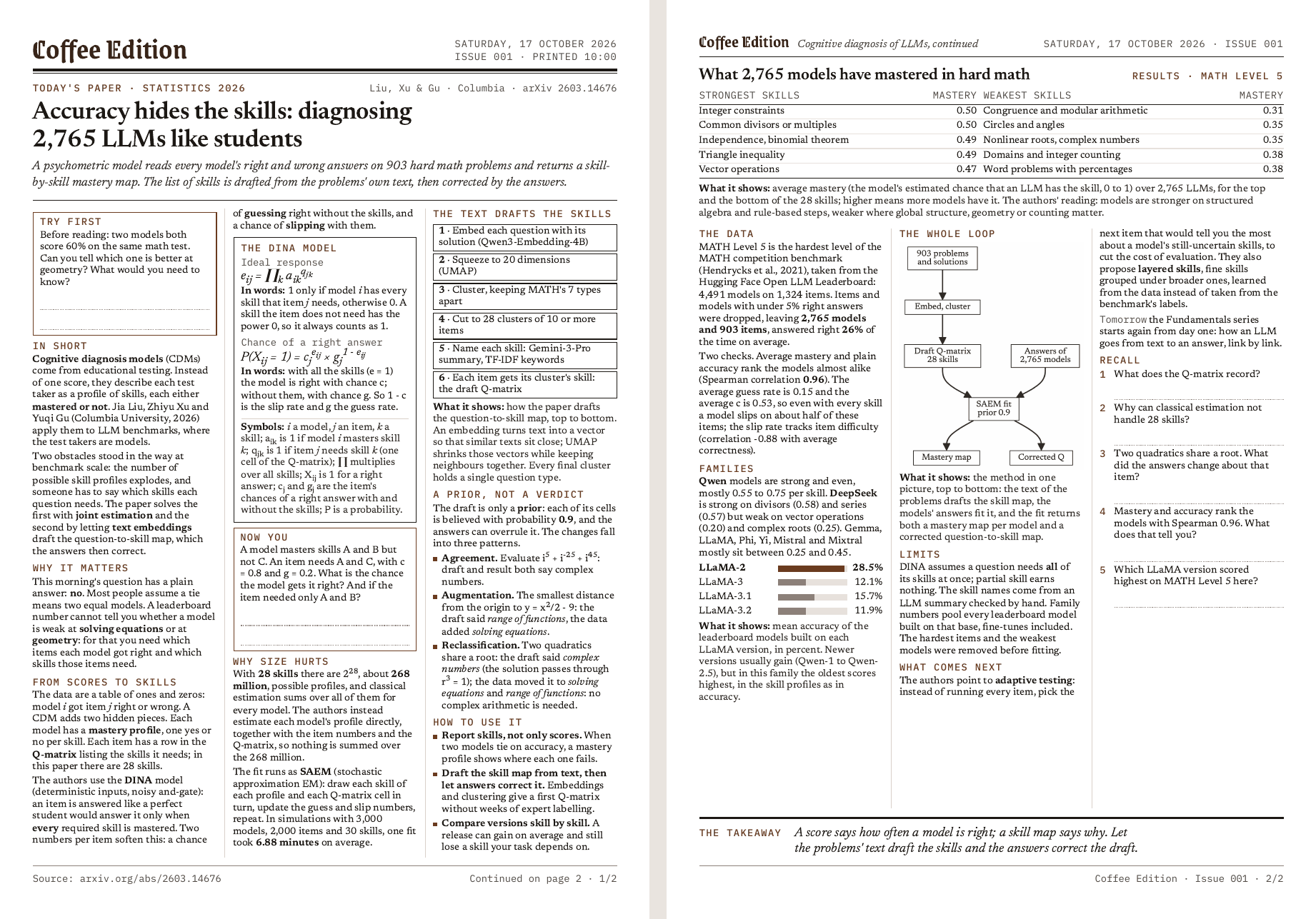
The routine never writes HTML. It writes an issue as JSON: a headline, a standfirst, and a list of blocks (paragraphs, labels, steps, formulas, code, tables, bar charts, mermaid diagrams). A fixed template lays the blocks out on A4 in three 12 px columns. A block that does not fit moves whole to a new page; the type never shrinks below 12 px, and only the line spacing tightens, from 14.5 to 14.25 to 14 px, to pull back a nearly empty last page.
Then the build distrusts its own output. It opens the page in headless Chrome with fonts that ship in the repository, so every machine breaks lines the same way, and refuses the issue when:
- a line or a box leaves its column, or the issue runs past four pages;
- a character exists in none of the bundled fonts (the browser would silently borrow a system font);
- a diagram's labels would print below 9 px at the width it prints at;
- the printed PDF has a different page count, or a different number of characters on any page, than the layout. A clipped line would go missing exactly here.
Diagrams are drawn by mermaid at their print width and photographed at 600 dpi, so the PDF carries a picture the printer can render. A refused issue never reaches the queue; the first error goes back to the routine, which fixes the file and tries again.
Printing raster on a cheap laser
My printer is an HP LaserJet M111w, an entry-level black-and-white laser that accepts only raster
documents: no PDF, no JPEG. Over IPP it
lists image/pwg-raster, image/urf and application/PCLm. So Actions renders each PDF page in 8-bit
gray and writes it in PWG framing: a sync word, a 1796-byte header per page, then each line as a repeat
count and runs of pixels. Pages are rendered without anti-aliasing, because a laser can only place a dot
or skip it: gray edge pixels would be halftoned into fuzz, and hard edges also roughly halve the file size.
The printer's needs live in one small file:
{
  "formats": ["image/pwg-raster"],
  "pwg_dpi": 600,
  "keep_days": 3,
  "edition_print_time": "08:45",
  "edition_print_time_weekend": "10:00",
  "nightly": "live"
}formatsis what Actions prepares for each job. The Pico sends the first one the printer accepts, in the order PDF, PWG raster, Apple raster, JPEG. One format here, because this printer takes nothing else.pwg_dpiis the raster resolution, in dots per inch: the pages are rendered at 600 for this printer.keep_daysclears jobs older than three days from the queue, so a printer that was off for a week does not print a stack of stale papers.edition_print_timeandedition_print_time_weekendare when an issue prints, in Istanbul time. Moving the morning paper from 06:45 to 08:45 was a change to this one line.nightlyswitches the writer:offwrites nothing,dry-runbuilds and archives the PDF without printing it,liveprints.
The Pico up close
The Pico runs MicroPython and has no battery-backed clock, yet it must not print a paper at the wrong
hour. Every answer from GitHub carries a Date header, so the Pico keeps the latest one plus the
milliseconds elapsed since it arrived. Until the first answer the clock is unknown, and scheduled jobs
wait.
_MONTHS = ("Jan", "Feb", "Mar", "Apr", "May", "Jun", "Jul", "Aug", "Sep", "Oct", "Nov", "Dec")

def _days(y, m, d):
    """Days from 1970-01-01 to a proleptic Gregorian date."""
    y -= m <= 2
    era = y // 400
    yoe = y - era * 400
    doy = (153 * (m - 3 if m > 2 else m + 9) + 2) // 5 + d - 1
    return era * 146097 + yoe * 365 + yoe // 4 - yoe // 100 + doy - 719468

def http_date_to_unix(s):
    """'Sat, 03 Oct 2026 18:23:09 GMT' -> Unix seconds."""
    parts = s.split()
    hh, mm, ss = (int(x) for x in parts[4].split(":"))
return _days(int(parts[3]), _MONTHS.index(parts[2]) + 1, int(parts[1])) * 86400 + hh * 3600 + mm * 60 + sssis theDateheader as GitHub sends it. Split on spaces,parts[1]is the day,parts[2]the month name (its place in_MONTHS, plus one, is the month number),parts[3]the year andparts[4]the time._days(y, m, d)counts days since 1 January 1970 with plain integer arithmetic. It shifts the year to start in March, so the leap day falls at the end;eracounts 400-year cycles of 146097 days;yoeis the year inside the cycle;doythe day inside that shifted year. No port-specific epoch, no library.- The result is Unix seconds, compared with each job's
print_at. A test checks both functions against Python's own calendar on 13 edge dates and 5000 random ones.
The rest of a poll is short. Read the job list; set aside jobs already printed (a state.json on the
board) and jobs not yet due, without waking the printer; find the printer (its last address first, then a
quick sweep of the network, then a patient one, because a sleeping printer answers slowly); stream the
file in 4 KB pieces, since the board has a few hundred kilobytes of RAM; record the job the moment the
printer accepts it, so a crash can never print it twice; and start a GitHub workflow that adds "printed"
to the log.
The writer and its guards
The routine's prompt is short on purpose. The real steps live in CLAUDE.md inside the repository, so
improving the writer is a commit, not an edit to the routine. Fixed scripts do everything that must not
depend on the model: which note is next, which date and issue number it gets, and the commit itself.
The table lists the guards in the order an issue meets them, with where each one runs and what it stops. The first three run before the issue is even pushed, the next two in Actions, and the last on the board next to the printer.
| Guard | Where it runs | What it stops |
|---|---|---|
| The issue is exactly the pick for its date | before the push | a wrong note, number, date or print time |
| A full build in Chrome | before the push | an issue that would be refused after it |
| No token or key patterns, no signature lines | before the push | secrets in git, a commit that is not mine |
| Layout and PDF checks | in Actions | a clipped line, a missing character, a fifth page |
| Not more than an hour late, one issue a date | in Actions | a paper at lunch, two papers in a morning |
state.json and the Date clock | on the Pico | a second copy, a paper before its time |
When a guard refuses, the writer reads the error, fixes the issue and tries again, a few times at most. If it cannot fix it, it deletes the file and stops. Printing nothing is better than printing something wrong.
What broke, and what I learned
- The cloud could not reach arXiv (5 October). The routine's sandbox allows a fixed list of hosts, and arXiv is not on it. Sources are now downloaded on my Mac and committed; the writer reads only local copies.
- The Pico hung (10 October). The first video issue was queued at 05:19 and missed its time: the board had frozen some time after the previous morning's print and no longer showed up on the network. Unplugging it fixed it, and it printed at once. A watchdog is on the list.
- Three issues were refused on their first try (11, 13 and 14 October). The cloud check did not lay the pages out, so a diagram with 6.5 px labels or a word wider than its column was only caught after the push. The routine's machine turned out to carry a Chromium, so the full build now runs before the push. I replayed the three refused versions: the old check accepted all three, the new one refuses all three with the error Actions gave. On 16 October the issue was accepted on its first push.
- GitHub refused a push mid-run (15 October). The queue went out, then the archive push failed on GitHub's side and the run stopped before writing the log. The paper printed, but the log never heard of it. I replayed the run with its clock frozen, and every push now retries, without letting the archive block the log.
- A good summary is not a lesson. Two weeks of well-written issues taught me less than I hoped, and jumping between topics day to day made them hard to follow. From 17 October the paper follows one thread: each issue opens with a problem to try before reading, leaves one step of an example for me, and ends with questions that come back with their answers the next morning. Saturdays are a review of the week.
A page of new methods
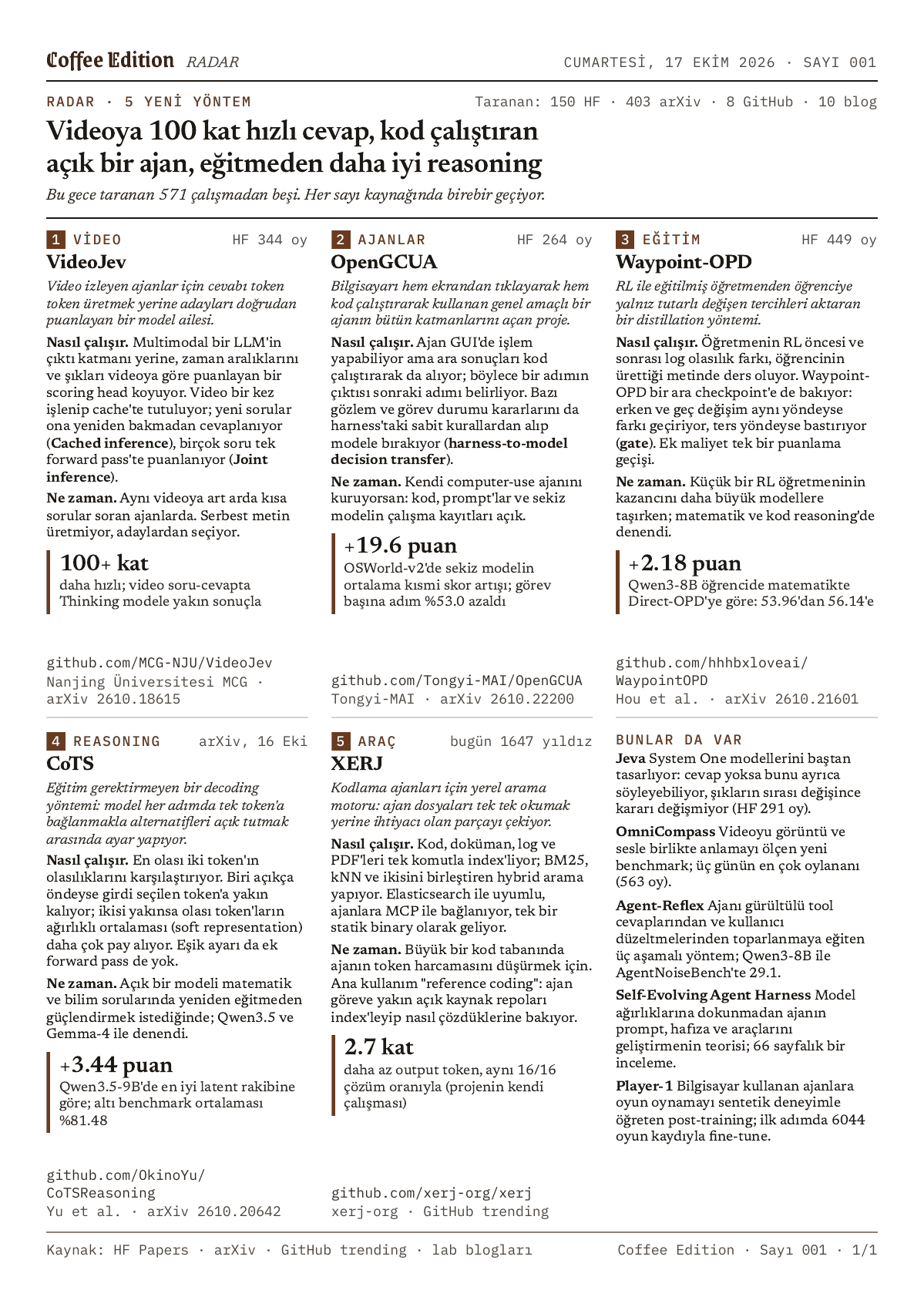
The paper teaches one thread, so new work needs a place of its own. Since 17 October every issue carries RADAR at the back: one to three pages of 5 to 17 new AI methods, models and tools from the night before.
At 03:30 a GitHub Action reads 23 feeds: Hugging Face's daily papers, trending papers and trending models, arXiv's new submissions in three categories, GitHub's trending repositories, 11 lab blogs, plus Hacker News and four AI newsletters, which only nominate. It stores each candidate with its text in the repository: the routine's sandbox cannot reach arXiv or most of these sites. At 05:15 the routine picks 5 to 17 of them from different areas and writes a card for each: what it is, how it works, when to use it, one number and a link to the code.
Every number on a card must appear in its source's text, and the sentence it comes from is kept in the issue file, so a check can find it there word for word. A work appears only once, as a card or in the list under the cards. If RADAR cannot pass its checks, the issue goes out without it.
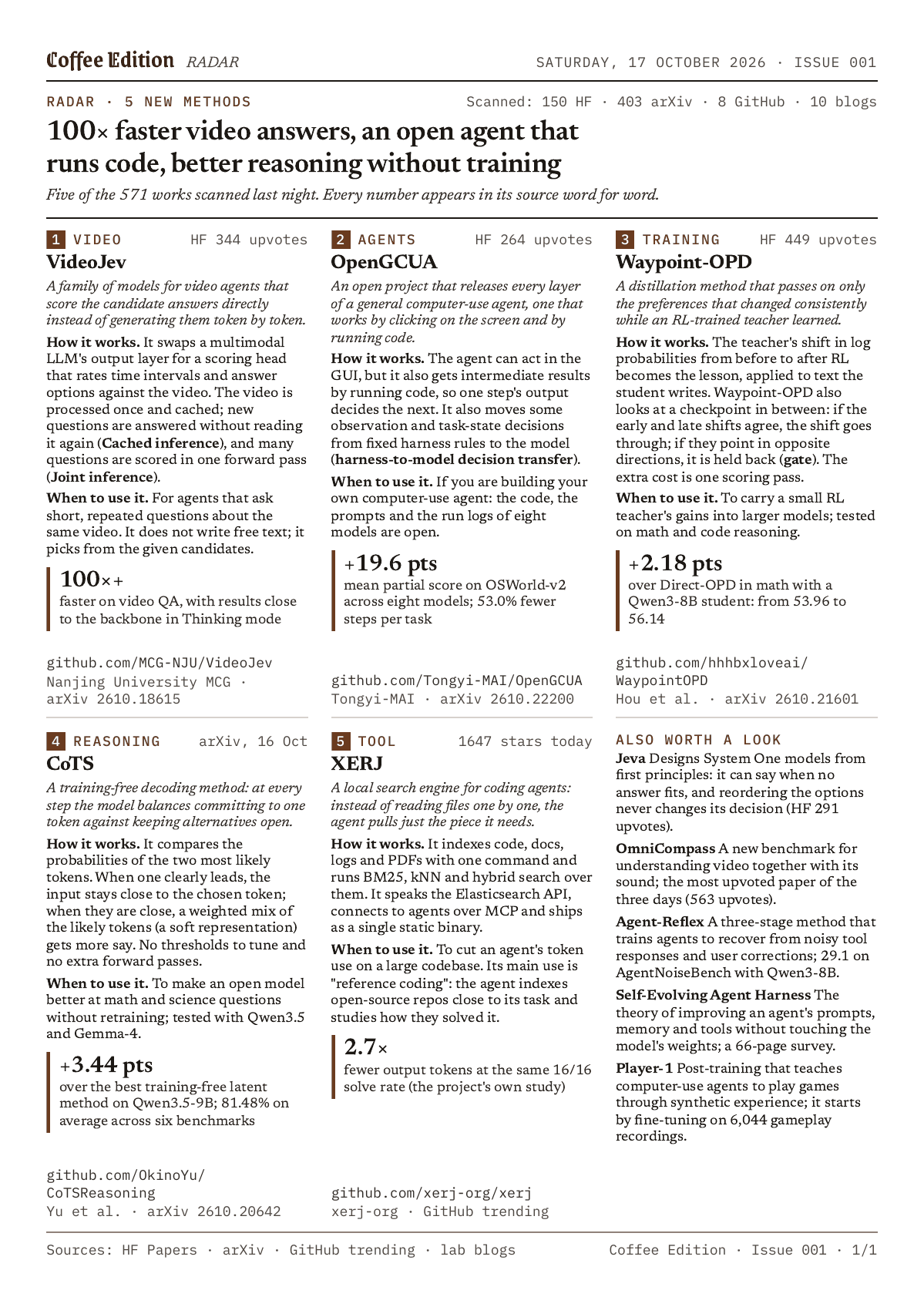
RADAR is in the kit too, off by default: "radar": true in printer.json turns it on.
Build your own
The setup is open source in coffee-edition-kit. Make a
private copy from the template, put your notes in notes/, and each night the routine turns the next one
into an issue. You need a Pico 2 W (tested, with MicroPython 1.28) or a Pico W (expected to work the same way), a network printer that accepts PDF, PWG raster or JPEG over IPP,
a GitHub account, and a Claude plan with Claude Code routines. Mine is a Pico 2 W running MicroPython 1.28,
powered by a phone charger, and an HP LaserJet M111w on the same Wi-Fi.
The fastest way in is SETUP_PROMPT.md: open your copy in Claude Code, paste it, and Claude walks you through
the settings, the token, MicroPython, a self-test against a fake printer, the first print and the routine. The
Pico has its own guide, from flashing the board to reading its log. The kit's sample issue is written from an
open-access paper, so you can print it before you have notes of your own.
Build your own
github.com/ierolsen/
Template, setup prompt for Claude Code, Pico guide and a sample issue you can print today. MIT licensed.
The takeaway
A paper that arrives on its own is a small system: a writer that can be wrong, a press that refuses to print when it is, and a courier that only ever pulls. Put a guard wherever a mistake can still be caught, and the printer only ever sees a page worth reading.
Her sabah yazıcımda iki sayfalık bir gazete bekliyor. Evde kimse yazdır tuşuna basmadı: bir Claude routine'i onu 05:15'te cloud'da yazdı, GitHub Actions sayfaları dizip her birini kontrol etti, Wi-Fi'daki bir Raspberry Pi Pico 2 W de 08:45'te (hafta sonları 10:00'da) yazıcıya gönderdi. Bu yazı üç parçayı, aralarındaki korumaları ve ilk iki haftada neyin bozulduğunu anlatıyor; sonra kendi gazeteni nasıl kurabileceğini gösteriyor.
Kendin kur
github.com/ierolsen/
Kurulumun tamamı açık kaynak bir GitHub template'i: private bir kopya oluştur, notlarını ekle, yazıcın her sabah bir gazete bassın.
Why paper
Ekranda çok okuyorum ama azını aklımda tutuyorum. Basılı sayfa ise bitmiş bir şey: yenilenmiyor, altında bir feed akmıyor, kahve hazır olduğunda hâlâ masada duruyor. Üzerine yazabiliyorum. Her sayı notlarımdan bir fikir alıyor ve onu iyi bir gazetenin tek bir haberi anlattığı gibi anlatıyor: büyük resim, nasıl çalıştığı, rakamlar, tuzaklar ve nasıl kullanılacağı.
Geri kalan her şeyi belirleyen kısıt şuydu: gazete bensiz gelmeli. Basmak için laptop açmam gerekiyorsa sabah ritüeli olmaktan çıkar, angaryaya dönüşür.
How a night works
Log'lardan bir gece: 14 Ekim. Sayı cloud'da yola çıktı, bir kez reddedildi, bir dakika içinde düzeltildi ve saatinde basıldı.
Üç parça birbiriyle doğrudan hiç konuşmuyor. Tek bir private git reposunu paylaşıyorlar: routine sayıyı
main üzerindeki inbox/'a commit'liyor, Actions baskı dosyalarını bir queue branch'ine, her PDF'i de
bir archive branch'ine yayımlıyor, Pico da queue'yu okuyor. Her adım arkasında bir dosya bırakıyor;
kötü giden bir sabahın izini her zaman sürebiliyorum.
Why the Pico pulls
Yazıcı ev router'ımın arkasında duruyor ve orada kalmasını istiyorum. Dışarıdan yazıcıya iş gönderecek her şeyin içeri girecek bir yola ihtiyacı var: açık bir port, bir tünel ya da evde hep açık duran bir bilgisayar. Pico bunların hiçbirine gerek bırakmıyor, çünkü dinlemiyor, soruyor. Tıpkı bir telefon gibi GitHub'a sıradan HTTPS istekleri gönderiyor, yani bağlantıyı hep kendisi açıyor; yazıcıyla da yerel ağda konuşuyor.
Tablonun her satırı bir işi yazıcıya ulaştırmanın bir yolu: neye ihtiyaç duyduğu ve neden seçmediğim. Kalın satır burada kurulan yol: evde hiçbir şey internete açılmıyor, arada başka bir servis yok ve yazıcının yanında açık kalan tek şey minicik bir kart.
| Yazıcıya iş ulaştırmanın yolu | Ne gerektiriyor | Neden seçmedim |
|---|---|---|
| Cloud'dan iş göndermek | router'da açık bir port ya da bir tünel | internetteki bir şey evdeki bir cihaza ulaşabilir hâle gelir |
| Evdeki bir bilgisayarın basması | bütün gece açık bir bilgisayar | amaç, yazıcı ve minik bir kart dışında hiçbir şeyin açık kalmamasıydı |
| Yazıcı üreticisinin cloud print servisi | üreticiden bir hesap ve bir uygulama | arada kendi kuralları olan bir servis daha |
| İşi kendisi çeken bir kart | dışarı giden HTTPS ve ev Wi-Fi'ı | hiçbir port açılmıyor; token yalnızca tek bir repoyu okuyor |
The newspaper engine
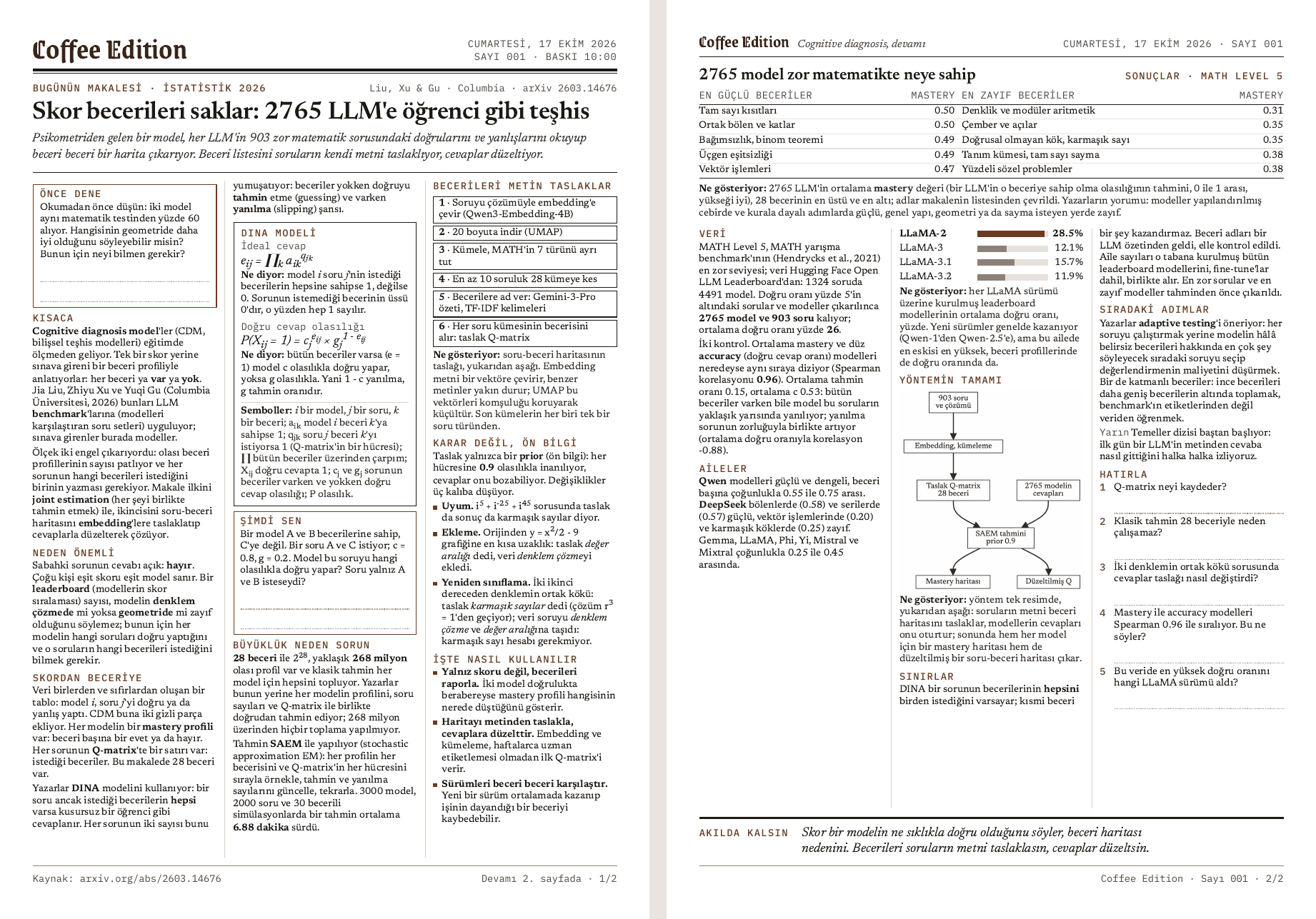
Routine hiç HTML yazmıyor. Sayıyı JSON olarak yazıyor: bir başlık, bir spot ve bir blok listesi (paragraflar, etiketler, adımlar, formüller, kod, tablolar, bar grafikler, mermaid diyagramları). Sabit bir şablon blokları A4'e, üç sütuna, 12 px yazıyla diziyor. Sığmayan bir blok bölünmeden yeni sayfaya geçiyor; yazı hiçbir zaman 12 px'in altına küçülmüyor. Son sayfa neredeyse boş kalacaksa onu geri çekmek için yalnızca satır aralığı daralıyor: 14,5'ten 14,25'e, sonra 14 px'e.
Sonra build kendi çıktısına bile güvenmiyor. Sayfayı repoyla gelen fontlarla headless Chrome'da açıyor; böylece her makine satırları aynı yerden bölüyor. Şu durumlarda sayıyı reddediyor:
- bir satır ya da kutu kendi sütunundan taşarsa ya da sayı dört sayfayı geçerse;
- bir karakter repodaki fontların hiçbirinde yoksa (tarayıcı sessizce bir sistem fontu ödünç alırdı);
- bir diyagramın etiketleri basıldığı genişlikte 9 px'in altına düşerse;
- basılan PDF'in sayfa sayısı ya da herhangi bir sayfasındaki karakter sayısı düzenden farklıysa. Kesilen bir satır tam burada eksik çıkar.
Diyagramları mermaid basılacakları genişlikte çiziyor ve 600 dpi'da fotoğraflıyor; böylece PDF yazıcının basabileceği bir resim taşıyor. Reddedilen bir sayı hiçbir zaman queue'ya girmiyor. İlk hata routine'e geri dönüyor, routine de dosyayı düzeltip yeniden deniyor.
Printing raster on a cheap laser
Yazıcım bir HP LaserJet M111w: raster dışında hiçbir belge kabul etmeyen, giriş seviyesi, siyah-beyaz
bir lazer. PDF yok, JPEG yok. IPP
üzerinden image/pwg-raster, image/urf ve application/PCLm listeliyor. Bu yüzden Actions her PDF
sayfasını 8 bit gri olarak çiziyor ve PWG formatında yazıyor: bir sync word, sayfa başına 1796 byte'lık
bir header, sonra her satır için bir tekrar sayısı ve piksel dizileri. Sayfalar anti-aliasing olmadan
çiziliyor, çünkü lazer bir noktayı ya basar ya basmaz: gri kenar pikselleri halftone yüzünden tüylü
çıkardı, keskin kenarlar da dosya boyutunu kabaca yarıya indiriyor.
Yazıcının ihtiyaçları tek bir küçük dosyada:
{
  "formats": ["image/pwg-raster"],
  "pwg_dpi": 600,
  "keep_days": 3,
  "edition_print_time": "08:45",
  "edition_print_time_weekend": "10:00",
  "nightly": "live"
}formats, Actions'ın her iş için hazırladığı biçimler. Pico şu sırayla bakıyor ve yazıcının kabul ettiği ilk biçimi gönderiyor: PDF, PWG raster, Apple raster, JPEG. Burada tek biçim var, çünkü bu yazıcı başka bir şey almıyor.pwg_dpi, inç başına nokta cinsinden raster çözünürlüğü: sayfalar bu yazıcı için 600 dpi'da çiziliyor.keep_days, üç günden eski işleri queue'dan siliyor. Bir hafta kapalı kalan yazıcı açılınca bir yığın bayat gazete basmıyor.edition_print_timeveedition_print_time_weekend, sayının hafta içi ve hafta sonu basılacağı saat, İstanbul saatiyle. Sabah gazetesini 06:45'ten 08:45'e almak için yalnızca bu satırı değiştirdim.nightly, yazarın anahtarı:offhiçbir şey yazmıyor,dry-runPDF'i basmadan derleyip arşivliyor,livebasıyor.
The Pico up close
Pico MicroPython çalıştırıyor ve pille çalışan bir saati yok; yine de bir gazeteyi yanlış saatte
basmamalı. GitHub'dan gelen her cevap bir Date header'ı taşıyor. Pico en son gelen header'ı ve o andan
beri geçen milisaniyeleri tutuyor. İlk cevaba kadar saat bilinmiyor ve zamanlı işler bekliyor.
_MONTHS = ("Jan", "Feb", "Mar", "Apr", "May", "Jun", "Jul", "Aug", "Sep", "Oct", "Nov", "Dec")

def _days(y, m, d):
    """Days from 1970-01-01 to a proleptic Gregorian date."""
    y -= m <= 2
    era = y // 400
    yoe = y - era * 400
    doy = (153 * (m - 3 if m > 2 else m + 9) + 2) // 5 + d - 1
    return era * 146097 + yoe * 365 + yoe // 4 - yoe // 100 + doy - 719468

def http_date_to_unix(s):
    """'Sat, 03 Oct 2026 18:23:09 GMT' -> Unix seconds."""
    parts = s.split()
    hh, mm, ss = (int(x) for x in parts[4].split(":"))
return _days(int(parts[3]), _MONTHS.index(parts[2]) + 1, int(parts[1])) * 86400 + hh * 3600 + mm * 60 + sss, GitHub'ın gönderdiğiDateheader'ı. Boşluklardan bölünceparts[1]gün,parts[2]ay adı (_MONTHSiçindeki sırasının bir fazlası ay numarası),parts[3]yıl,parts[4]saat._days(y, m, d), 1 Ocak 1970'ten bu yana geçen günleri düz tam sayı aritmetiğiyle sayıyor. Yılı marttan başlatıyor, böylece artık gün yılın sonuna düşüyor;era146097 günlük 400 yıllık döngüleri,yoedöngü içindeki yılı,doybu kaydırılmış yıldaki günü sayıyor. MicroPython port'una göre değişen bir epoch yok, kütüphane de yok.- Sonuç Unix saniyesi ve her işin
print_atalanıyla karşılaştırılıyor. Bir test iki fonksiyonu da 13 uç tarihte ve 5000 rastgele tarihte Python'un kendi takvimiyle karşılaştırıyor.
Bir poll'un geri kalanı kısa. Pico iş listesini okuyor. Basılmış işleri (karttaki state.json'da
duruyorlar) ve zamanı gelmemiş işleri yazıcıyı uyandırmadan bir kenara ayırıyor. Sonra yazıcıyı arıyor:
önce bildiği son adrese bakıyor, sonra ağı hızlıca, ardından sabırla tarıyor, çünkü uyuyan bir yazıcı geç
cevap veriyor. Kartta yalnızca birkaç yüz kilobayt RAM olduğu için dosyayı 4 KB'lık parçalarla akıtıyor.
Yazıcı işi kabul ettiği an bunu kaydediyor; böylece bir çökme aynı işi asla iki kez bastıramıyor. En sonda
log'a "printed" ekleyen bir GitHub workflow'unu başlatıyor.
The writer and its guards
Routine'in prompt'u bilerek kısa. Asıl adımlar reponun içindeki CLAUDE.md'de duruyor; yazarı
geliştirmek için routine'i düzenlemiyorum, bir commit atıyorum. Modele bağlı olmaması gereken her şeyi
sabit script'ler yapıyor: sıradaki notun hangisi olduğu, hangi tarihi ve sayı numarasını alacağı ve
commit'in kendisi.
Tablo korumaları bir sayının karşılaştığı sırayla veriyor: her satırda korumanın nerede çalıştığı ve neyi durdurduğu var. İlk üçü sayı daha push'lanmadan, sonraki ikisi Actions'ta, sonuncusu da yazıcının yanındaki kartta çalışıyor.
| Koruma | Nerede çalışıyor | Neyi durduruyor |
|---|---|---|
| Sayı, o tarihin seçimiyle birebir aynı | push'tan önce | yanlış not, numara, tarih ya da baskı saati |
| Chrome'da tam build | push'tan önce | push'tan sonra reddedilecek bir sayı |
| Token ya da anahtar kalıbı yok, imza satırı yok | push'tan önce | git'e sızan sırlar, benim olmayan bir commit |
| Düzen ve PDF kontrolleri | Actions'ta | kesik satır, eksik karakter, beşinci sayfa |
| En fazla bir saat gecikme, günde tek sayı | Actions'ta | öğle yemeğinde gelen gazete, bir sabaha iki gazete |
state.json ve Date saati | Pico'da | ikinci kopya, zamanından önce basılan gazete |
Bir koruma reddettiğinde yazar hatayı okuyor, sayıyı düzeltip yeniden deniyor; en fazla birkaç kez. Düzeltemezse dosyayı silip duruyor. Yanlış bir şey basmaktansa hiçbir şey basmamak daha iyi.
What broke, and what I learned
- Cloud arXiv'e ulaşamadı (5 Ekim). Routine'in sandbox'ı yalnızca sabit bir host listesine izin veriyor ve arXiv o listede yok. Kaynakları artık Mac'imde indirip commit'liyorum; yazar yalnızca yerel kopyaları okuyor.
- Pico takıldı (10 Ekim). İlk video sayısı 05:19'da queue'ya girdi ve saatini kaçırdı: kart bir önceki sabahki baskıdan sonra bir ara donmuştu, ağda da görünmüyordu. Fişini çekip takınca kendine geldi ve sayıyı hemen bastı. Bir watchdog yapılacaklar listesinde.
- Üç sayı ilk denemede reddedildi (11, 13 ve 14 Ekim). Cloud'daki kontrol sayfaları dizmiyordu; 6,5 px etiketli bir diyagram ya da sütunundan geniş bir kelime ancak push'tan sonra yakalanıyordu. Routine'in makinesinde bir Chromium bulunduğu ortaya çıktı; artık tam build push'tan önce çalışıyor. Reddedilen üç sürümü yeniden çalıştırdım: eski kontrol üçünü de kabul ediyordu, yenisi üçünü de Actions'ın verdiği hatayla reddediyor. 16 Ekim'de sayı ilk push'ta kabul edildi.
- GitHub bir push'u yarı yolda reddetti (15 Ekim). Önce queue gitti, sonra archive push'u GitHub tarafında hata verdi ve çalışma log'u yazmadan durdu. Gazete basıldı ama log'un ondan haberi olmadı. O çalışmayı saati dondurarak yeniden çalıştırdım; artık her push yeniden deneniyor ve archive'daki bir hata log'u engelleyemiyor.
- İyi bir özet, ders demek değil. İki hafta boyunca gelen sayılar iyi yazılmıştı ama umduğumdan az şey öğrettiler; her gün başka bir konuya atlamak da onları takip etmeyi zorlaştırdı. 17 Ekim'den itibaren gazete tek bir hat üzerinde ilerliyor: her sayı okumadan önce denenecek bir problemle açılıyor, bir örneğin bir adımını bana bırakıyor ve ertesi sabah cevaplarıyla geri gelen sorularla bitiyor. Cumartesileri haftanın tekrarı basılıyor.
A page of new methods
Gazete tek bir konu hattını izliyor; yeni çalışmalar için ayrı bir yer gerekiyordu. 17 Ekim'den beri her sayının arkasında RADAR var: bir önceki gecenin 5 ila 17 yeni AI yöntemi, modeli ve aracı, bir ila üç sayfada.
Gece 03:30'da bir GitHub Action 23 kaynak okuyor: Hugging Face'te günlük ve trend makaleler ile trend modeller, arXiv'in üç kategorideki yeni gönderileri, GitHub'da trend olan repolar, 11 lab blogu, bir de yalnız aday öneren Hacker News ve dört AI bülteni. Her adayı metniyle birlikte repoya kaydediyor; routine'in sandbox'ı arXiv'e ve bu sitelerin çoğuna ulaşamıyor. 05:15'te routine farklı alanlardan 5 ila 17 tanesini seçip her biri için bir kart yazıyor: ne olduğu, nasıl çalıştığı, ne zaman işe yaradığı, tek bir sayı ve kodun linki.
Karttaki her sayı kaynağın metninde geçmek zorunda. Sayının geldiği cümle de sayı dosyasında duruyor; bir kontrol onu kaynakta birebir arıyor. Bir çalışma yalnız bir kez çıkıyor: ya kartta ya da kartların altındaki listede. RADAR kontrollerden geçemezse sayı onsuz basılıyor.
RADAR kitte de var, varsayılan olarak kapalı: printer.json'da "radar": true onu açıyor.
Build your own
Kurulum coffee-edition-kit içinde açık kaynak.
Template'ten private bir kopya oluştur, notlarını notes/ klasörüne koy; her gece routine sıradakini bir
sayıya çeviriyor. Gerekenler: bir Pico 2 W (MicroPython 1.28 ile test edildi) ya da
Pico W (aynı şekilde çalışması bekleniyor), IPP üzerinden PDF, PWG raster ya da JPEG kabul
eden bir ağ yazıcısı, bir GitHub hesabı ve Claude Code routine'leri olan bir Claude planı. Benimki:
MicroPython 1.28 çalıştıran, telefon şarj aletiyle beslenen bir Pico 2 W ve aynı Wi-Fi'daki bir HP
LaserJet M111w.
En hızlı yol SETUP_PROMPT.md: kopyanı Claude Code'da aç ve prompt'u yapıştır. Claude seni adım adım
götürüyor: ayarlar, token, MicroPython, sahte bir yazıcıyla self-test, ilk baskı ve routine. Pico'nun da
kendi rehberi var: kartı flash'lamaktan log'unu okumaya kadar. Kitin örnek sayısı açık erişimli bir
makaleden yazıldı; kendi notların olmadan da onu basabilirsin.
Kendin kur
github.com/ierolsen/
Template, Claude Code için kurulum prompt'u, Pico rehberi ve bugün basabileceğin örnek bir sayı. MIT lisanslı.
The takeaway
Kendi kendine gelen bir gazete aslında küçük bir sistem: yanılabilen bir yazar, yanıldığında basmayı reddeden bir matbaa ve işi hep kendisi çeken bir kurye. Bir hatanın hâlâ yakalanabildiği her yere bir koruma koy; yazıcı da yalnızca okumaya değer bir sayfa görsün.